

如何在Rstudio的继任者Positron上用GPT最新模型帮助你写代码?
前言
如果你是 R 语言用户,一定对 RStudio 不陌生。而现在,RStudio 的开发公司 Posit(原 RStudio 公司)推出了下一代数据科学 IDE —— Positron。 Positron 不仅继承了 RStudio 对 R 语言的优秀支持,还原生集成了 AI 编程助手,可以帮你写代码、调试、重构,甚至解释复杂的代码逻辑。 本文将手把手教你如何在 Positron 中配置 GPT 最新模型(如 GPT-5.2、GPT-4o),让 AI 成为你的编程助手。
1. 准备工作
1.1 下载安装 Positron
访问 Positron 官网下载:https://positron.posit.co/download.html 支持 Windows、macOS 和 Linux。
1.2 获取 API Key
要使用 AI 功能,你需要先获取一下bioinfoark的key: https://www.bioinfoark.com/?page_id=902
点击免费领取 Key即可领取key, 点击下方的充值按钮即可充值.
💡 bioinfoark 的 API 支持多种模型,包括 GPT-5.2、GPT-4o 等最新模型,按用量计费, 没有月费, 用多少付多少即可~
2. 配置 settings.json
2.1 打开设置文件
在 Positron 中,按下快捷键Ctrl+Shift+P(Windows)或 Cmd+Shift+P(macOS) ,输入:
Preferences: Open User Settings (JSON)2.2 启用 AI Assistant 将以下配置粘贴到 settings.json 文件中:
{
    "positron.assistant.enabledProviders": ["openai-compatible"],
    "positron.assistant.models.include": [
        "^gpt-4o-mini$",
        "^gpt-4o$",
        "^gpt-5\\.2$"
    ],
    "positron.assistant.models.preference.global": "gpt-4o-mini",
    "positron.assistant.enable": true
}
配置说明:
| 设置项 | 作用 |
|---|---|
enabledProviders |
启用 OpenAI 兼容的自定义 Provider |
models.include |
用正则表达式过滤模型,^...$ 表示精确匹配 |
models.preference.global |
设置默认模型 |
保存后,按Ctrl+Shift+P(Windows)或 Cmd+Shift+P(macOS) 之后, 再运行命令
Developer: Reload Window 重新加载 Positron。
2.3 配置 API 连接
按 Cmd+Shift+P,输入 Positron Assistant: Configure Language Model Providers
选择 Custom Provider
填入:
API Key: 你的 bioinfoark API Key
Base URL: https://oa.ai01.org/v1
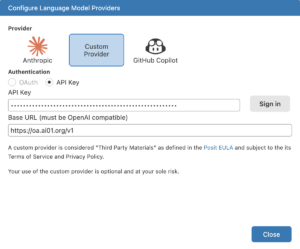
点击 Sign in 即可使用!
3. 设置自定义 Prompt
为了让 AI 更懂 R 语言和你的编程风格,我们可以创建自定义 Prompt。
3.1 创建 Prompt 文件
按 Cmd+Shift+P,输入
Chat: New Prompt File…选择最下面的 User Data(全局生效)
输入文件名,如 r-code
3.2 编写 R 语言专属 Prompt
将生成的 r-code.prompt.md 文件内容替换为:
---
name: "R Code Assistant"
description: "R 语言高级编程助手"
mode: agent
---

你是一位资深的 R 语言高级架构师,专注数据科学与可重复研究。请遵守以下规则:

## 代码风格
- 优先使用 tidyverse(dplyr、tidyr、ggplot2),避免 base R 的冗长写法,除非用户明确要求
- 变量命名使用 snake_case
- 使用管道操作符 |> 或 %>%
- 适当换行与注释,保持可读性

## 输出规范
- 先给简短思路,再给完整可运行代码
- 若涉及包,请注明需要 library() 哪些包
- 代码注释使用中文

## 代码重构
- 若用户给的是混乱或旧风格 R 代码,主动建议重构为现代 tidyverse 风格并说明理由

## 可视化
- 优先使用 ggplot2 进行数据可视化
- 图表添加清晰的标题和轴标签
保存后,在 Chat 输入框输入 / 就能看到并使用这个 Prompt。
4. 实战演示:用 AI 重构丑陋的 R 代码
现在来看看 AI 的实际效果。
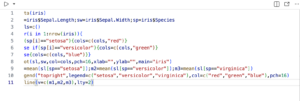
4.1 原始代码(反面教材)
下面是一段"能跑但很烂"的 R 代码:
data(iris)
sl=iris$Sepal.Length;sw=iris$Sepal.Width;sp=iris$Species
cols=c()
for(i in 1:nrow(iris)){
if(sp[i]=="setosa"){cols=c(cols,"red")}
else if(sp[i]=="versicolor"){cols=c(cols,"green")}
else{cols=c(cols,"blue")}}
plot(sl,sw,col=cols,pch=16,xlab="",ylab="",main="iris")
m1=mean(sl[sp=="setosa"]);m2=mean(sl[sp=="versicolor"]);m3=mean(sl[sp=="virginica"])
legend("topright",legend=c("setosa","versicolor","virginica"),col=c("red","green","blue"),pch=16)
abline(v=c(m1,m2,m3),lty=2)
这段代码的问题:
- 变量命名混乱(sl, sw, sp, m1, m2, m3)
- 用 for 循环拼接向量(效率极低)
- 没有换行和缩进
- 使用 base R plot(丑)
- xlab/ylab 为空
- 硬编码颜色
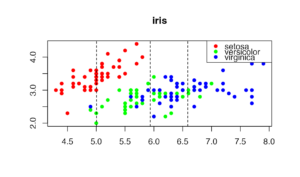
生成的结果也很丑
4.2 使用 AI 重构
- 选中这段代码(这一步很重要!)
- 右键选择
Positron Assistant或使用快捷键打开Inline Chat - 输入:
请用 tidyverse 风格重构这段代码,使用 ggplot2 绘图,..4.3 AI 重构后的代码
然后GPT就可以帮你重构代码:
library(tidyverse)

# 计算每个物种的萼片长度均值
species_means <- iris |>
  group_by(Species) |>
  summarise(mean_sepal_length = mean(Sepal.Length))

# 绑制散点图
ggplot(iris, aes(x = Sepal.Length, y = Sepal.Width, color = Species)) +
  geom_point(size = 3) +
  geom_vline(
    data = species_means,
    aes(xintercept = mean_sepal_length, color = Species),
    linetype = "dashed"
  ) +
  scale_color_manual(values = c("setosa" = "#E41A1C",
                                 "versicolor" = "#4DAF4A",
                                 "virginica" = "#377EB8")) +
  labs(
    title = "Iris 数据集:萼片长度与宽度的关系",
    x = "萼片长度 (cm)",
    y = "萼片宽度 (cm)",
    color = "物种"
  ) +
  theme_minimal()
FAQ
1. 为什么选这 3 个模型?
| 模型 | 适用场景 | 成本 |
|---|---|---|
| gpt-4o-mini | 日常编程、简单任务 | 💰 最便宜,推荐默认 |
| gpt-4o | 中等复杂度、调试重构 | 💰💰 中等 |
| gpt-5.2 | 复杂架构、疑难问题 | 💰💰💰 最强但最贵 |
2. 是否支持 Claude 和 Gemini?
目前 Positron 对 Claude 和 Gemini 模型的支持存在兼容性问题:
-
Claude 模型:Positron 发送的
tool_choice参数格式与 Claude API 不兼容,会报错tool_choice: Input should be a valid dictionary -
Gemini / Grok 模型:虽然bioinfoark支持这些模型,但 Positron 的模型过滤逻辑无法正确识别,导致不显示在选择列表中.
⚠️ 这是 Positron 目前的限制,与 bioinfoark API 服务无关。bioinfoark 的 API 完整支持 Claude、Gemini、Grok 等模型,在其他支持这些模型的客户端(如 ChatBox、NextChat、Cherry studio 等)中可以正常使用。
期待 Positron 后续版本修复这些兼容性问题。目前建议使用 GPT 系列模型。
以上情况是在2026年2月4日, Positron版本 2026.02.0 build 139得到的.
具体版本信息如下:
Positron Version: 2026.02.0 build 139
Code - OSS Version: 1.106.0
Commit: 4b472e9bf40ca88f886fe9c7fcfbb9ee702fccd0
Date: 2026-01-29T04:44:10.743Z
Electron: 37.7.0
Chromium: 138.0.7204.251
Node.js: 22.20.0
V8: 13.8.258.32-electron.0
OS: Darwin arm64 24.6.0
3 遇到"无法选择模型"怎么办?
如果下拉菜单为空或模型不显示:
检查是否已 Sign in(Configure Model Providers 里显示 Sign out 表示已登录) 检查 models.include 正则是否正确(注意转义 \.) 尝试移除 models.include 测试是否是过滤规则问题 运行 Developer: Reload Window 重载
4 如何节省 Token?
默认使用 gpt-4o-mini 只在需要时切换到更强的模型 提问时尽量精确,避免冗长的上下文 定期开启新对话,避免历史消息累积
6. 总结
通过本文,你学会了: ✅ 在 Positron 中配置 OpenAI 兼容的 API 服务 ✅ 使用正则表达式精选模型列表 ✅ 创建 R 语言专属的自定义 Prompt ✅ 用 AI 将丑陋的 base R 代码重构为优雅的 tidyverse 风格 Positron + AI 的组合,让 R 语言编程效率大幅提升。无论是新手学习还是老手提效,都值得一试!
相关链接:
- Positron 官网:https://positron.posit.co/
- Positron Assistant 文档:https://positron.posit.co/assistant-getting-started.html
- bioinfoark API 服务:bioinfoark key 获取